October 7, 2026 at 12:00 PM ET
Webinar Recap: Transforming Research Data Access with GenAI
A Practical Multi-Agent Text-to-SQL Approach
Access Webinar Recording
Please fill out this form to access the recorded webinar.
Overview
Every research office has the data. What it usually lacks is the time to pull it together, check it, and turn it into an answer before the meeting where someone asks for it.
Chandni Mathur, a senior data analyst in the Office of Research and Graduate Programs at the Grainger College of Engineering (University of Illinois Urbana-Champaign), built a tool to close that gap. It is an AI analytics assistant that lets approved staff ask questions in plain English and get back a table or chart from the institution's own data. She walked through how it works, how she keeps the data safe, and how she checks the answers, then ran it live.
Why dashboards were not enough
The office has research staff with 20-plus years of experience and deep knowledge of the data. Many are not set up to build their own Power BI or Tableau dashboards, so they work in Excel or send a request to an analyst. A new dashboard takes weeks, sometimes months. A change to an existing one waits for the next monthly cycle.
Dashboards also work best for questions you already know to ask: awards by sponsor, expenditure, the usual recurring reports. They do not handle the question nobody planned for. Chandni's example was a dean's cabinet meeting where the dean asks how many quantum proposals the college sent out this year. The data to answer it exists. A dashboard to answer it does not.
How the assistant works
Chandni explained the design with a doctor's office. You tell the receptionist you have a heart problem, and the receptionist sends you to a cardiologist, not an ENT. The tool works the same way, and it has two parts that matter:
- The orchestrator is the receptionist. It reads the question and decides which specialist should handle it.
- The agents are the specialists. Each one is a language model that knows one dataset: its column names, data types, and what the values look like. There is a proposal agent, and others for awards, expenditure, applications, admissions, and enrollment. When someone asks "How many proposals were submitted in fiscal year 2026?", the orchestrator sends it to the proposal agent. That agent writes a SQL query, the query runs inside the university's secure environment, and the answer comes back as a table or chart. The user never has to write the SQL.
The tool has two products. One serves research (proposals, awards, expenditure, grants). The other, called A2G, covers the student side from application to graduation. The whole stack runs on Azure, since Illinois is a Microsoft shop.
What it looked like live
In the A2G demo, Chandni asked for the acceptance rate trend by fall semester in the CS PhD program and got back a clean table she could download or turn into a chart. She also asked for the academic life cycle of a single (encrypted) student ID and got the application, admission, and enrollment dates.
On the research side, she asked for the top 10 PIs by total expenditure, then how many quantum proposals went out between fiscal years 2021 and 2026. The answer was 166 distinct proposals with "quantum" in the title. An Explanation button shows how the model read the question, so the user can see whether it understood.
She also showed two features that drew early adoption:
- Encrypt Columns. Upload any file, pick the columns that identify people, enter a key, and download the encrypted version plus a mapping file.
- Upload and chat. Upload that file and ask questions about it, so you are not limited to the data already loaded. The uploaded data is deleted automatically afterward.
Security and privacy come first
Because the data covers students and PIs, Chandni built the privacy controls into the design from the start. There are four layers:
- Strip what you do not need. Home addresses, SSNs, and other columns that are not needed for questions never enter the system.
- Encrypt what you do need. Student IDs, PI names, and PI IDs are encrypted with SHA-256 before any model sees them. It is one-way, so the model cannot reverse it. Only someone with the mapping file can match a value back to a real person.
- Isolate each step. SQL runs on a separate Linux server, a Python script cleans the data and pushes it to a Box folder, and Chandni moves it into Azure by hand. No single system touches the whole chain.
- Control who gets in. Users sign in with university single sign-on and multi-factor authentication, which limits access to illinois.edu accounts. A second list in Active Directory then limits it to people approved to see this data.
Everything sits inside the university's infrastructure, so data does not leave it. Even if it did, the model would only see encrypted values.
Why not just use ChatGPT or Claude?
Chandni gave two reasons. General-purpose enterprise tools cost more to run, and you cannot put institutional data into them without de-identifying it and getting sign-off from security and compliance on rules like FERPA. A tool inside a secure environment avoids both problems.
Checking the answers
The tool can be wrong. It is code, and Chandni was direct that the user and the developer are both responsible for validating what comes back. Her approach has several parts:
- A test set. She keeps 24 test questions per agent and runs them every month. If the answers stay consistent, that is the first check.
- Compare to what you know. On larger datasets, staff check the big numbers against existing dashboards. People who have worked with this data for years often know right away when a number is off.
- Read the SQL and the explanation. The developer reviews the generated SQL. Users can read the plain-English explanation of how the question was interpreted.
- Clarify in plain English. If the answer is not what you meant, say so and the model rethinks it. Prompt engineering works here.
She also reviews users' chats as a feedback loop, and that is how she finds out where the tool falls short.
Getting people to use it
Chandni said staff were skeptical at first. They trusted the methods they had used for years. The people who pushed for it were the ones who knew the data best and were tired of waiting on an analyst, including the associate dean for research. The encryption and upload features won over the rest, because staff could ask questions of their own files without worrying about where the data went.
For context, she has been in the role about five years. When she started, everything was manual in Excel. She automated the pipeline first, then built dashboards for leadership, and then built this assistant. It extends that work. It does not replace it.
Audience questions
Can it connect to a university data warehouse? Yes. In Azure, you can write SQL against the warehouse, then use Data Factory to run Python for post-processing such as cleaning column names and removing white space.
How does an office like ours get started? The assistant Chandni showed is custom-built, with every piece written and tested by her. Offices that cannot build one can start with enterprise versions of tools like ChatGPT or Microsoft Copilot. An analyst who knows SQL and Python helps a lot if you build your own.
How often does the data update? On the first of each month, and that is configurable. It can be twice a month or once a year.
If the data is already in the warehouse, what does this add? Most staff cannot write SQL, and drag-and-drop report tools only go so far. The assistant can join proposals, awards, and expenditure in one question, run deeper analysis, build charts and slides, and suggest which analyses to run. Chandni called it an analytics tool, not a business intelligence tool and not a reconciliation tool.
What's next
Chandni wants to add coverage, such as linking student data to funding sources so the office can see how TAs and RAs are funded by grant awards, and to keep growing adoption by making the tool useful enough that people choose it. To try this at your own institution, you need an Azure subscription, which many universities already have. Freely available language models are an option if budget is a concern.
Key takeaways
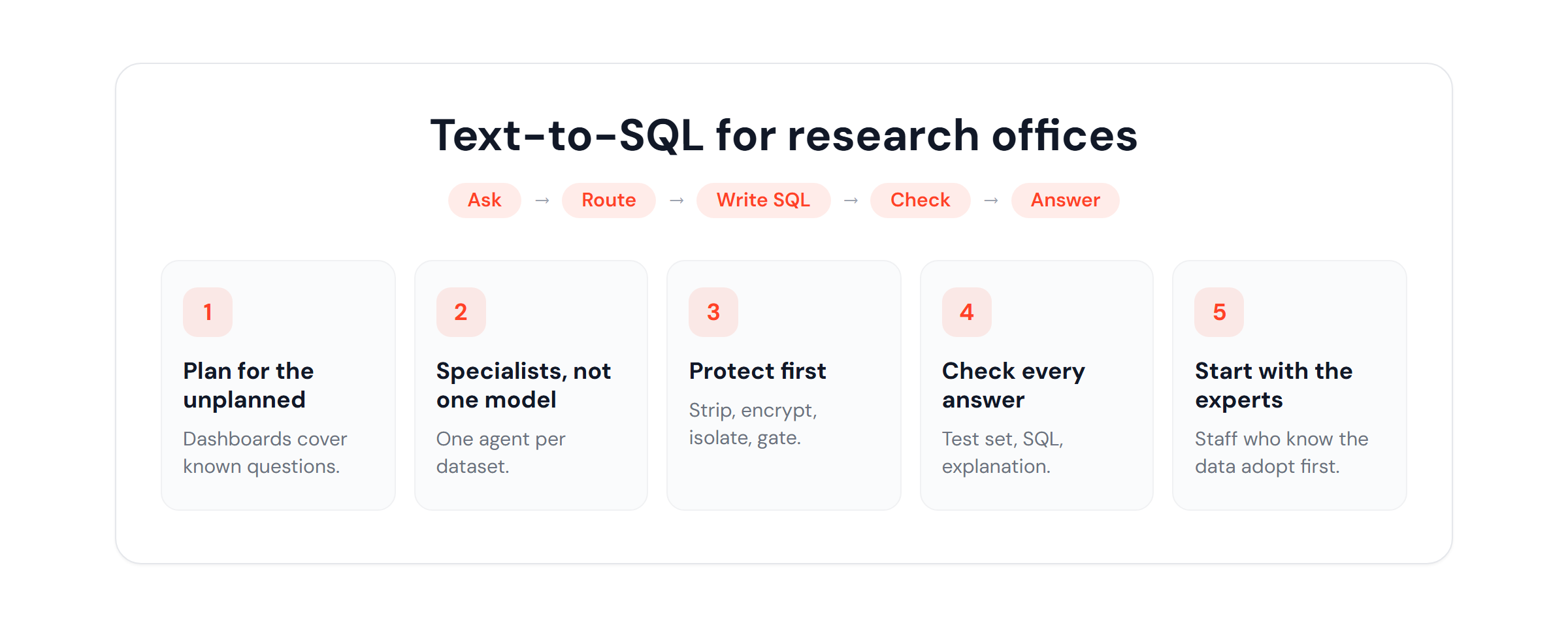
- Dashboards answer the questions you planned for. A plain-English assistant answers the ones you did not.
- A routing agent plus specialist agents keeps each model focused on one dataset. Strip, encrypt, isolate, and gate access before any model sees institutional data.
- Validate every answer: a standing test set, a gut check against known numbers, and a read of the SQL and explanation.
- Start with the people who already know the data and are waiting on reports. They are the ones who will use it.
It is a code at the end of the day. It's our responsibility to check it against the data that we already know and understand. But it just allows you to quickly do this.
About the Speaker

Chandni Mathur is Data Analyst on the Research Analytics team at the University of Illinois. She works across SQL, Python, and Linux to provide analytical support, and builds and maintains the Tableau dashboards that track the key metrics behind the university's proposals, grants, and student data.