Proposals: A more intuitive workspace and inline editor
Proposals has been updated with intuitive navigation for each step, from guide to submission. You can also write documents and build the budget right in Atom instead of only uploading files.
AAndrew Dean·October 28, 2026
Until now, a proposal in Atom had two tabs: Guide and Documents. Everything else was tucked inside them. The budget was a step-by-step flow inside Documents, reviews lived on each document's card, and to see where a proposal stood you had to click around.
We've redesigned Proposals so each part of the work has its own place. Here's what changed.
Every step has its own tab
A proposal now has six tabs, in the order you'd work through them: Overview, Guide, Documents, Budget, Review and Finalize.
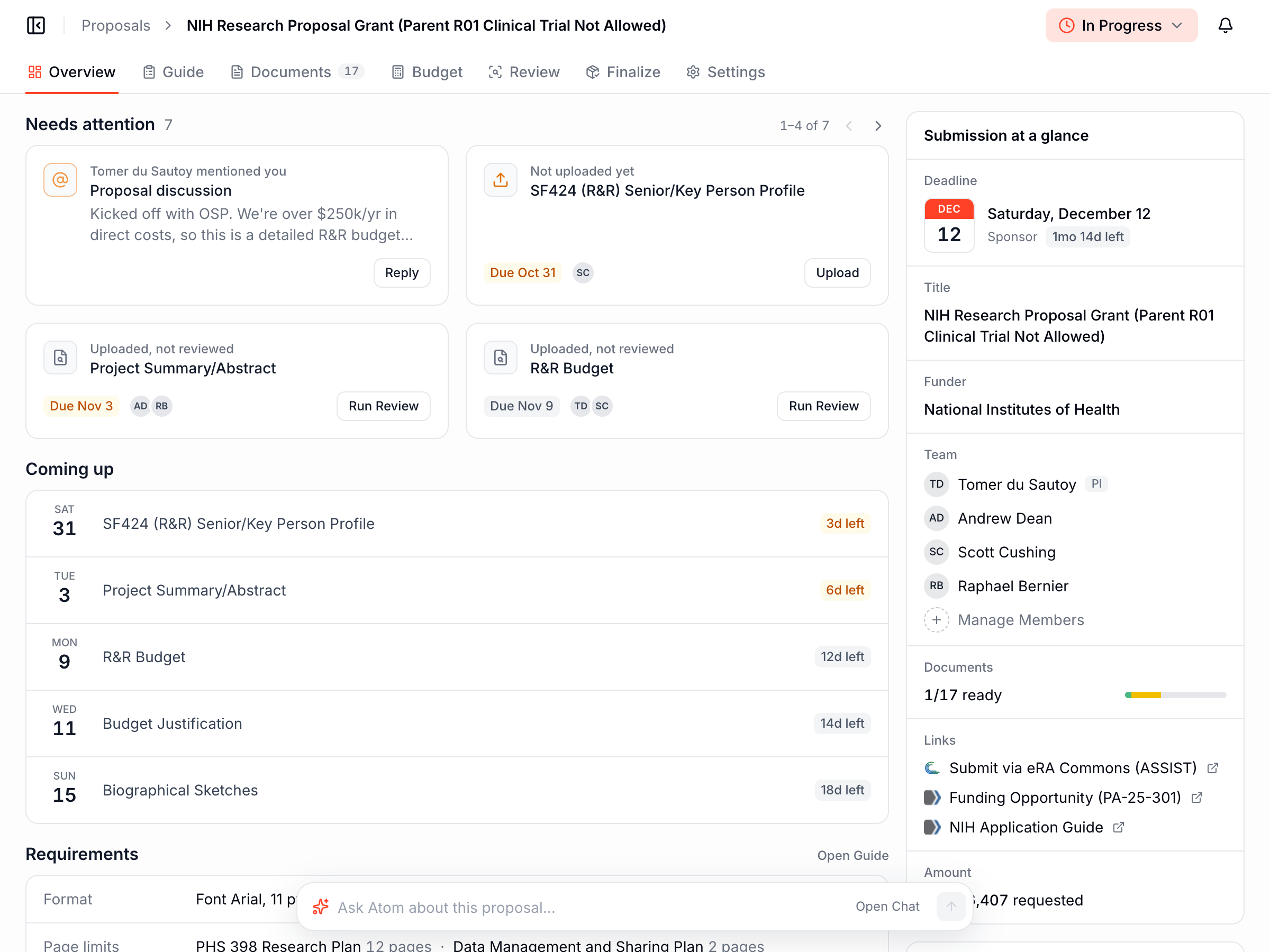
Overview is new, and it's where you land. It's built to answer one question: what do I need to do next? At the top is anything that needs your attention, like a comment that mentions you, a document nobody has uploaded yet, or a draft that hasn't been reviewed. Below that are the next deadlines and the funder's formatting rules. The team, the sponsor's deadline and links to the funder's portal sit on the right.
The guide is easier to read
The guide is still Atom's summary of the solicitation, but it now reads as one document with a table of contents beside it. An "At a glance" box pulls out the formatting rules and the things people tend to miss. You can also see the solicitation pages Atom used to write it, and email or download the guide for your team.
Write your documents right in Atom
Documents are now grouped into folders like Narrative, Budget and People, each with an owner, a due date and a status. The ones you worked on recently sit at the top so you can pick up where you left off. If you prefer a board view, there's one of those too.
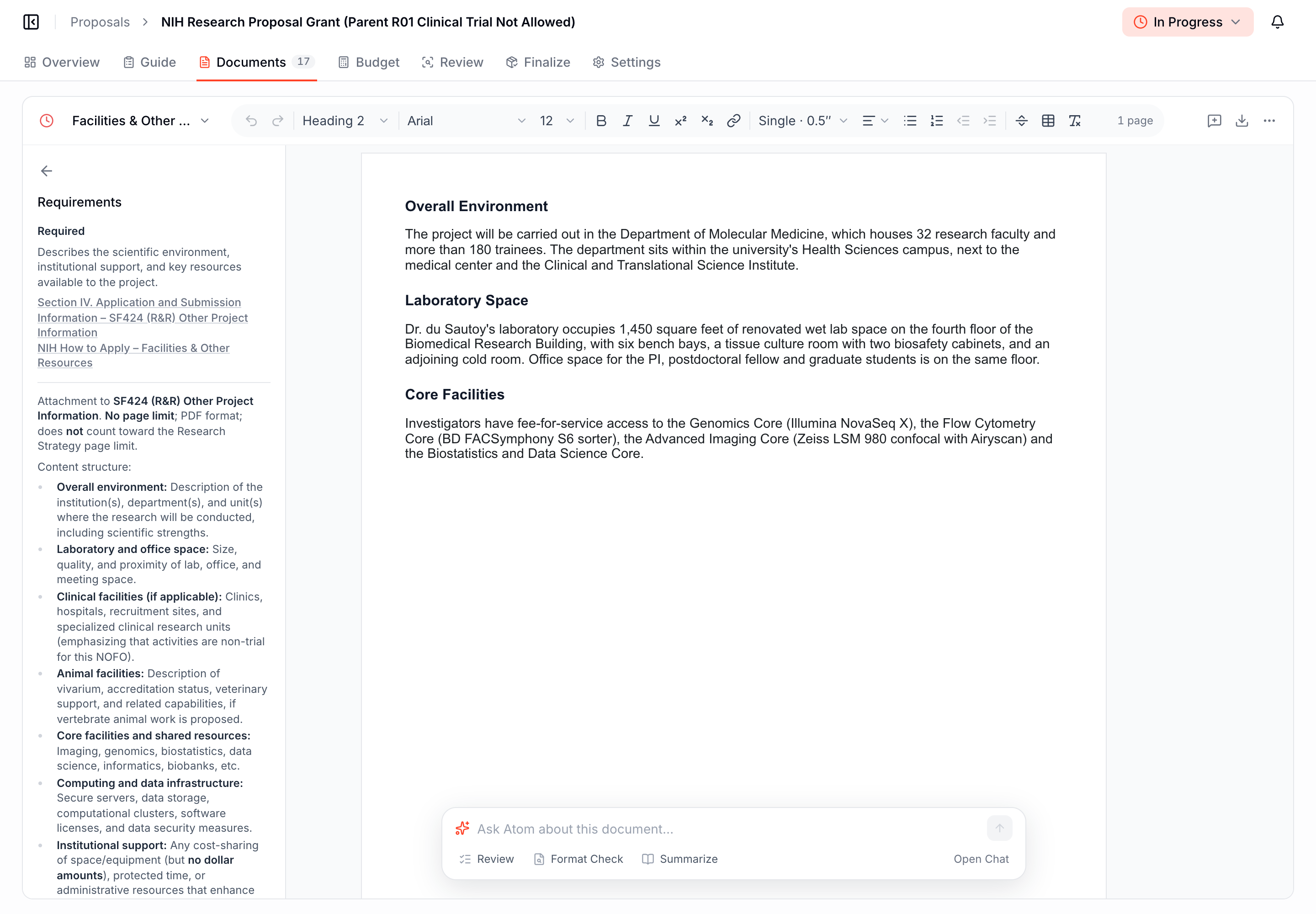
The bigger change is that you don't have to upload a file to get started anymore. You can start a document from your office's template, from an outline Atom writes based on the solicitation, or from a blank page, and write it right in Atom. The editor works a lot like Google Docs, with real pages, and it flags text that breaks the funder's formatting rules while you write. Already have a draft going? Upload your Word or PDF file and click Open in Editor to keep working on it right in Atom. Your original file stays in the version history.
The budget is a spreadsheet in Atom
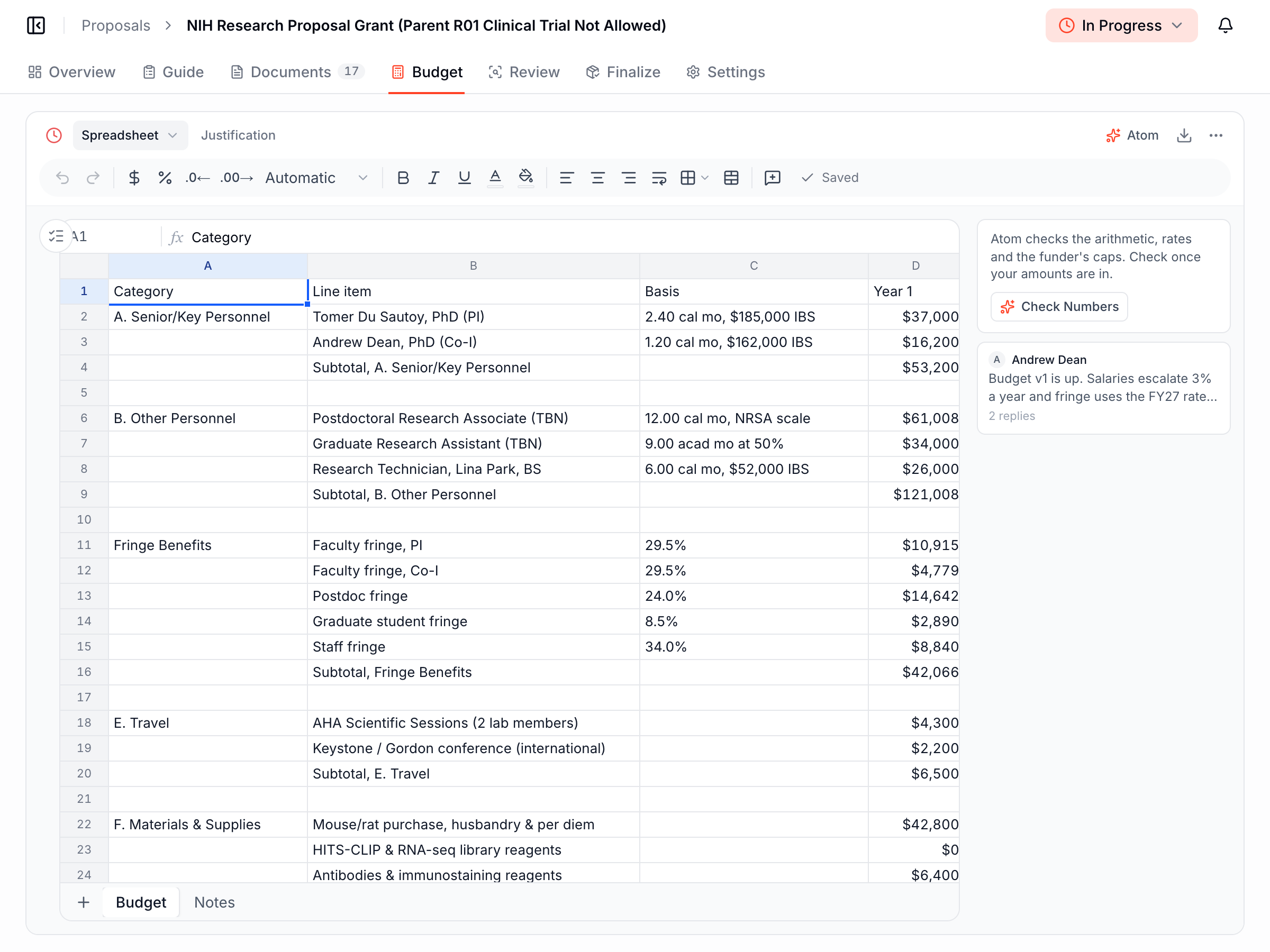
Before, you built the budget in Excel and uploaded it for Atom to check. Now the spreadsheet lives in the Budget tab. Atom can set up a starting budget for you, sized to the project period and using your institution's rates. From there you can comment on cells, select a few rows and ask Atom about them, or have it suggest edits.
When the numbers are in, Atom drafts the budget justification from the spreadsheet and checks that the two agree. If they don't, it shows you both figures side by side. You can download the budget as an Excel file at any time.
All your reviews in one place
The Review tab shows every draft, whether it's been reviewed, and which documents are still waiting on a draft. Drop a Word or PDF onto the page and Atom works out which document it is. One button reviews everything that hasn't been reviewed yet.
Reviews also check your institution's own policies now, not just the funder's rules. If your office changes a policy, older reviews are marked out of date so nobody relies on a pass that no longer holds.
Finalize when you're ready to submit
Finalize is the last step. It lists every document going to the sponsor, points out the ones that haven't been started, and downloads the latest version of everything at once. There's a printable checklist too. Once the proposal is in, mark it as submitted.
For research offices, Rules is now the Library
If you run proposals for your institution, the Rules page is now called the Library, and it does more. You can add:
- Instructions Atom follows when it writes a guide, like "our internal deadline is 5 business days before the sponsor's"
- Documents and templates every proposal should start with
- Notices that appear at the top of each proposal, exactly as you wrote them
- Notifications, so the right people hear about things like a new budget upload
- Policies, like your budget or cost-share rules, which Atom checks when it reviews drafts
Each item can apply to every proposal or only to a certain funder or department. New items also reach proposals that are already underway, so you don't have to go back and update them one by one.
How do I get it?
It's already live, so there's nothing to install or turn on. Open any proposal in Atom and you'll see the new tabs. Your existing proposals, documents and reviews all carry over. If you manage proposals for your institution, you'll find the Library under Proposals in the left sidebar.
If something feels off or you have ideas, we'd love to hear from you at support@atomgrants.com.
A
Andrew Dean
Founding Engineer, Atom Grants
More Blog Posts
The 10 Best Grant Databases for 2026
For universities, researchers, and nonprofits
Read post
Welcome to the team!
Meet our VP of Academics and Senior Software Engineer
Read post
SRAI Annual Meeting 2026
Leading Research Development in the Age of AI Panel
Read post
Introducing Admin Analytics
The numbers we bring to your check-ins, now in Atom whenever you need them.
Read post
NIH AI Policy: New Rules of AI in Proposal Development
Inside the 2026 NIH policies reshaping how researchers write grants and proposals.
Read post
Budgets, in Atom
A workspace for the whole budget: the spreadsheet, the justification Atom AI can write for you, and the funder rules that grade both.
Read post
Atom AI Reviewer
A funder-grade read of your whole proposal, before anyone else sees the draft.
Read post