Atom AI Reviewer
A funder-grade read of your whole proposal, before anyone else sees the draft.
AAndrew Dean·August 12, 2026
The hardest part of a grant is not writing it. It is knowing whether what you wrote will survive a review panel. Solicitations are long, the requirements are scattered, and the people who score your proposal are looking for reasons to say no. Most teams do not find out where the gaps are until it is too late to fix them.
The Atom AI Reviewer is built to close that gap. It reads your solicitation, your requirements, and every document in your package, then gives you the kind of review a real program officer would: grounded, specific, scored on the funder's own scale, and honest about what would make the difference between funding and decline. This post walks through how it works, where its knowledge comes from, and how to get the most out of each tool.
Why it is different: it actually reads your solicitation
Most AI writing tools give you generic feedback because they only see the words in front of them. The Atom reviewer is grounded in your specific opportunity. When a review runs, the model is given far more than the draft:
- The full solicitation. Atom pulls the complete text of the funding opportunity, including every source it fetched when building your guide, and feeds it into the review. The reviewer knows the page limits, the required sections, and the rules that apply to your grant.
- The funder's review criteria. Atom uses the actual scoring criteria for your opportunity. When the solicitation does not spell them out, it falls back to the standard rubric for that agency, such as the NIH scored criteria or the NSF Intellectual Merit and Broader Impacts framework.
- What each document is supposed to contain. Your proposal guide defines the required documents and what each one must include. The reviewer checks your draft against that specification, not against a generic idea of a good proposal.
- The rest of your package. For the full review, every uploaded document is read together, so the reviewer can catch mismatches between them.
Because it is grounded in your real requirements, the feedback is specific enough to act on. Every strength and weakness it raises points back to the exact sentence in your document that prompted it.
The review toolbox
Open any document in your proposal and you get a set of focused tools. Each one does a different job, so you can run a quick check or a deep read depending on where the draft is.
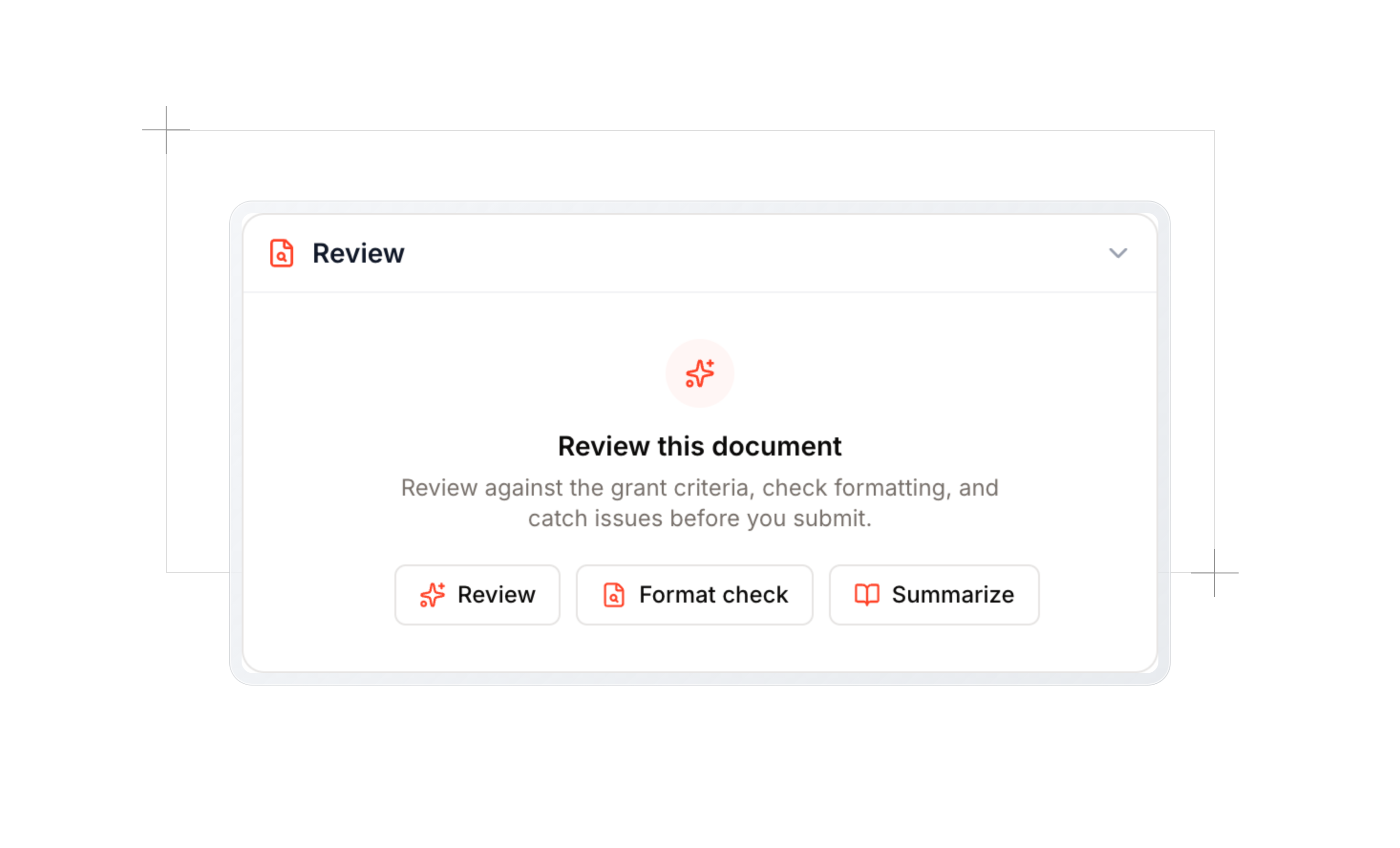
Review
The core tool. Run it on any draft to check it against the requirements for that document. It does two things at once: a requirements check that flags anything missing or out of spec (a missing Broader Impacts section, a page limit you are over, a required element that is not there), and a format check for the mechanical details. Every gap is labeled by the requirement it concerns and linked to the sentence that triggered it. If you upload a new version of a document you already reviewed, the reviewer compares it against the previous read and tells you which of the earlier gaps you actually addressed.
Format check
The same formatting engine, on its own. It inspects the details reviewers use to screen proposals out before they even read them: font size, margins, line spacing, page limits. It reports each finding with a severity so you know what is a real problem and what is minor. It looks only at formatting, so it never gets distracted by the content.
Summarize
A fast way to get the gist of a file a teammate uploaded. It returns a one line summary and a handful of key points, so you can catch up on a collaborator's draft without reading the whole thing.
Budget review
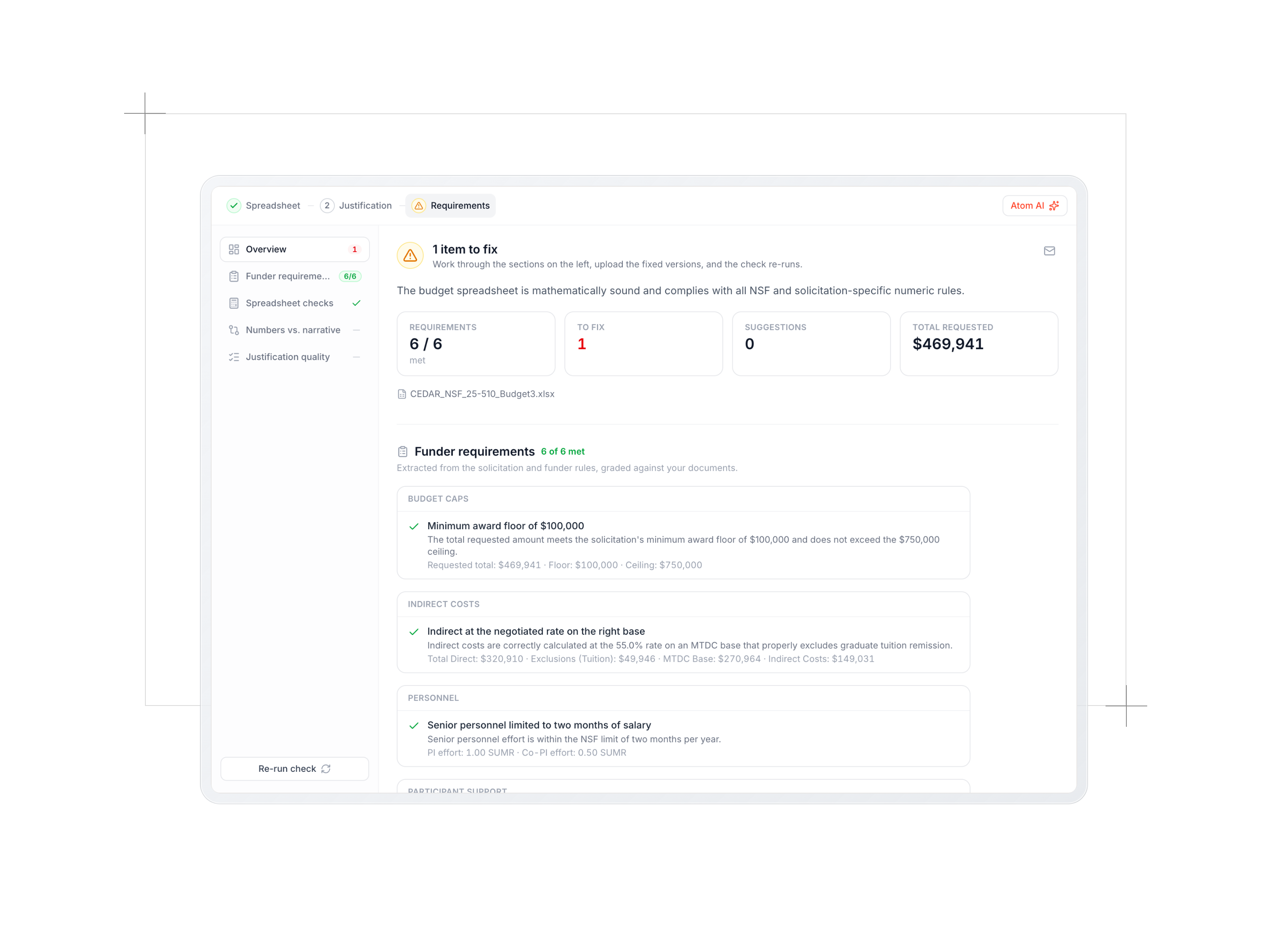
Budgets are where proposals quietly fall apart, so they get more than a section in the review. Budgets get their own workspace inside the proposal's Requirements step, with three stages you move through: the spreadsheet, the justification, and the funder check that grades both. Atom AI finds your budget spreadsheet and your budget justification narrative automatically, pulls the funder's budget rules out of the solicitation, and works through them in order:
- The numbers on their own. It reads the spreadsheet as a structured table and checks the arithmetic: line items roll up to category totals, direct plus indirect equals the total, escalation is sane, and nothing breaks the funder's caps.
- The justification, drafted or reviewed. No narrative yet? Atom AI writes a first draft from the spreadsheet, line by line. Already have one? It reads it the way a program officer would, checking allowability and whether every line states a real basis rather than just a dollar amount.
- The two against each other. Totals should match, effort should line up with salary, and every budgeted line should be described in the justification. It ends with a plain verdict: Strong, Adequate, or Needs Work.
The rules it checks against are funder specific. It knows the NIH salary cap and modular increments, the NSF two months of salary guideline and participant support separation, and the categories each agency expects.
There's a lot more happening here than one section can hold. We wrote about the budget reviewer on its own in Budgets, in Atom.
The full proposal review
When a substantial draft is in, run the full review. This is the one that mimics a review panel. Instead of looking at a single document, it reads your entire package and produces a complete assessment.
Here is what it does, in order:
- Checks every document. It makes sure each required document has been reviewed, running any that are missing, so it knows what is present, what has gaps, and what is still absent.
- Plans the criteria. Acting as a panel chair, it builds the list of criteria it will score you on, starting from your funder's framework and folding in the dimensions your specific solicitation cares about. It always adds a check on readability and on required structure.
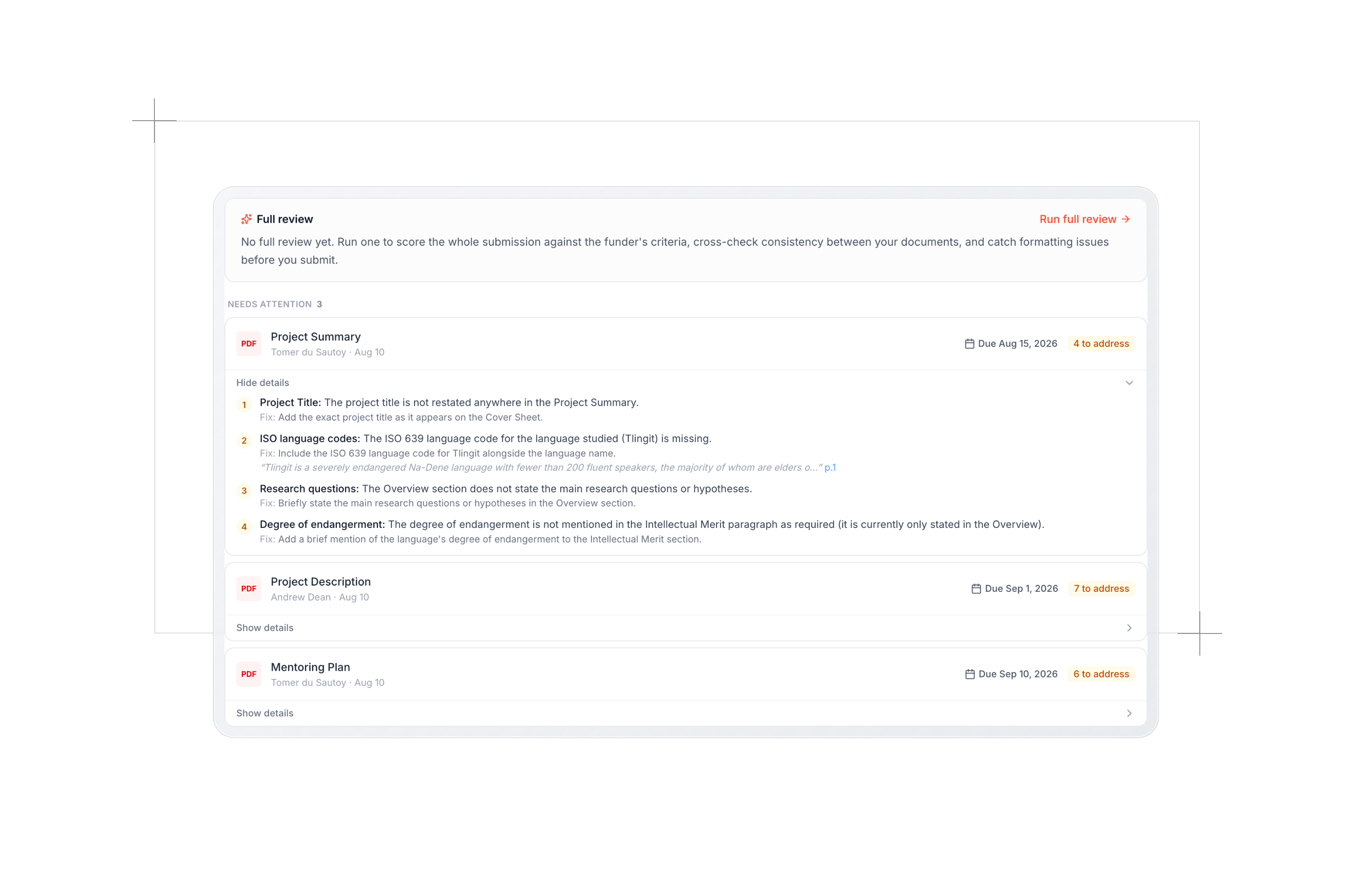
- Scores each criterion. Each criterion gets an independent read of the full narrative, with two to four concrete strengths and two to four weaknesses, each weakness rated by severity and tied to a specific sentence.
- Synthesizes an overall verdict. It weighs your approach and significance most heavily, the way real panels do, and produces an overall score with a short written assessment.
- Cross-checks your documents against each other. This is the pass a single document review can never do. It looks for mismatches across your package: a budget that funds one postdoc while the narrative describes work for three, equipment named in the plan but missing from the budget, timelines that do not agree between the narrative and the budget period, a team that does not match the scope. These are the inconsistencies that sink otherwise strong proposals.
- Checks formatting on the core narrative.
You get an overall score, section by section strengths and weaknesses with suggested fixes, the cross document consistency findings, formatting flags, and a readiness view of which required documents are in good shape.
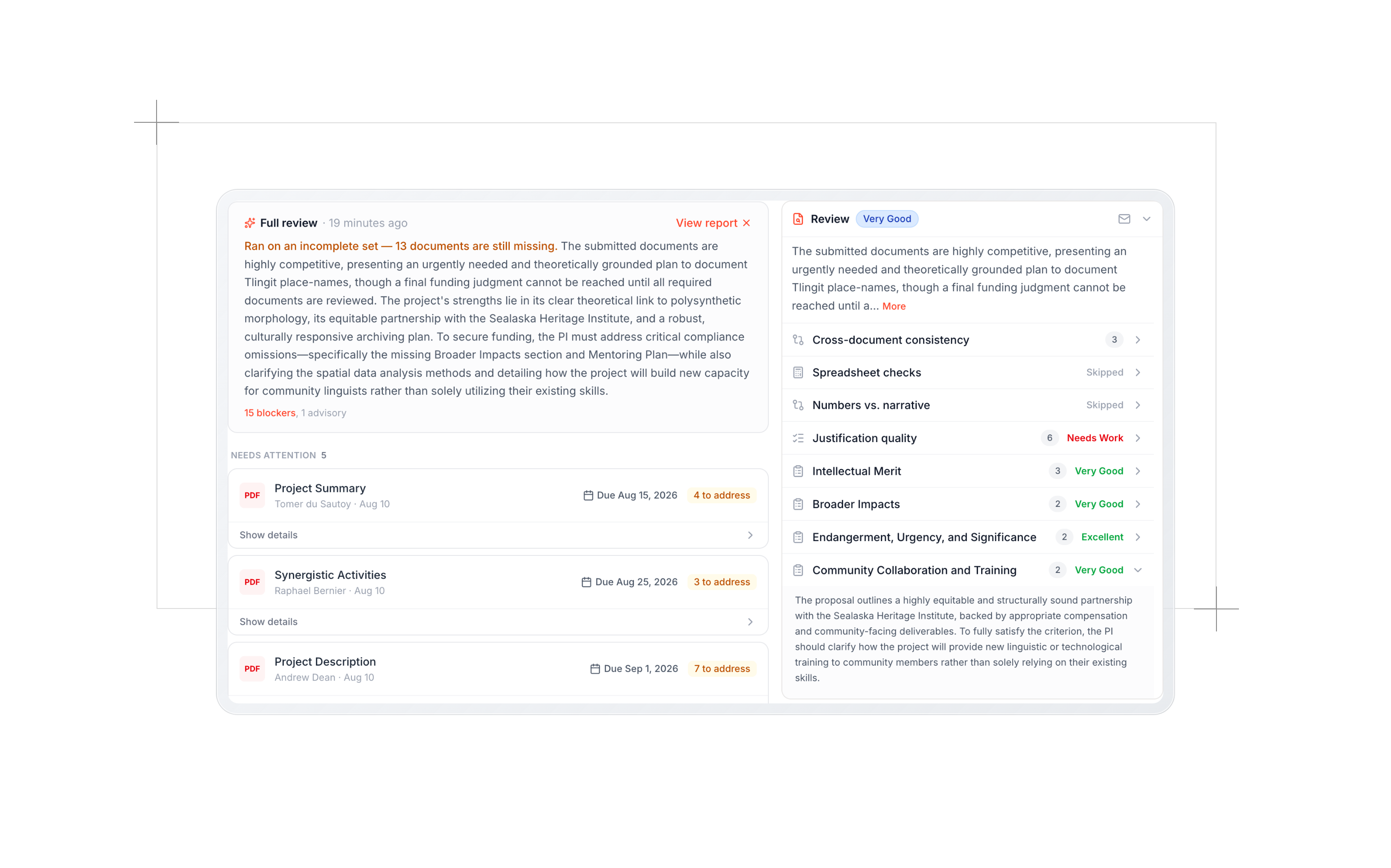
Scored on the funder's own scale
The score is not a generic grade. It uses the scale your funder actually uses. An NIH review comes back on the 1 to 9 scale, where 1 is exceptional. An NSF review uses the word ratings, from Excellent down to Poor. Department of Education reviews follow the points based scheme in the solicitation. The result reads the way the real review will, so the score means something to you and to your research office.
Built to sound like a real reviewer
The full review is written in the voice of an experienced reviewer on a study section or review panel, the kind who has read hundreds of proposals and wants this one to succeed. It is calibrated to be direct without being dismissive, to stress test its own praise ("is this genuinely strong, or am I just praising the absence of a problem?"), and to tell you what would move the proposal from decline to funding. It grounds every point in a specific sentence, and it will flag factual problems like a defunct dataset or a facility that no longer exists. It is a tough read on purpose, because the real one will be.
At the same time, the single document and budget checks are deliberately objective. They are meticulous completeness checks, not opinion. They tell you what is missing or inconsistent without editorializing, so you can trust a clean result.
Private, and shared with your team
Your uploads stay private to you and your team. Atom never uses your documents to train AI models and never publishes them anywhere.
Within your team, reviews are shared. When one person runs a review, the result is saved to the document, so a collaborator who opens the same file sees it without rerunning the same check. A full review, a budget review, and a single document review all show up wherever that document lives. When you upload a new version of a document, Atom notices the change and prompts you to rerun, and marks the old review as outdated in the meantime, so you can see exactly how much your revisions improved things.
How to get the most out of it
A few habits help teams get value quickly:
- Review early and often. Run a quick review as soon as a draft exists, not just at the end. The requirements check catches structural gaps while they are still cheap to fix.
- Let it be the first reviewer. Treat the AI review as a pre review. Have your writing team tighten drafts in Atom before they reach your internal read through, so your human reviewers see a stronger proposal and spend their time on substance.
- Run the budget review before you think you need to. Budget and narrative drift apart as both change. A quick reconciliation catches it early.
- Run a full review before every milestone. The cross document consistency pass catches the mismatches a single document check never will, and those are the ones that cost you.
- Re-upload and rerun. After a revision, rerun the review to confirm the gaps are closed and watch the score move.
Try it on your next proposal
The Atom AI Reviewer brings a funder grade review inside your workflow, grounded in your real solicitation and your real requirements. It reads the whole thing so you do not have to reread the PDF, it checks every document against what it is supposed to be, and it cross checks your package the way a panel would. The gaps are found while you can still fix them. Run it on your next proposal and see what a reviewer would say before one ever does.
A
Andrew Dean
Founding Engineer, Atom Grants
More Blog Posts
Proposals: A more intuitive workspace and inline editor
Proposals has been updated with intuitive navigation for each step, from guide to submission. You can also write documents and build the budget right in Atom instead of only uploading files.
Read postThe 10 Best Grant Databases for 2026
For universities, researchers, and nonprofits
Read post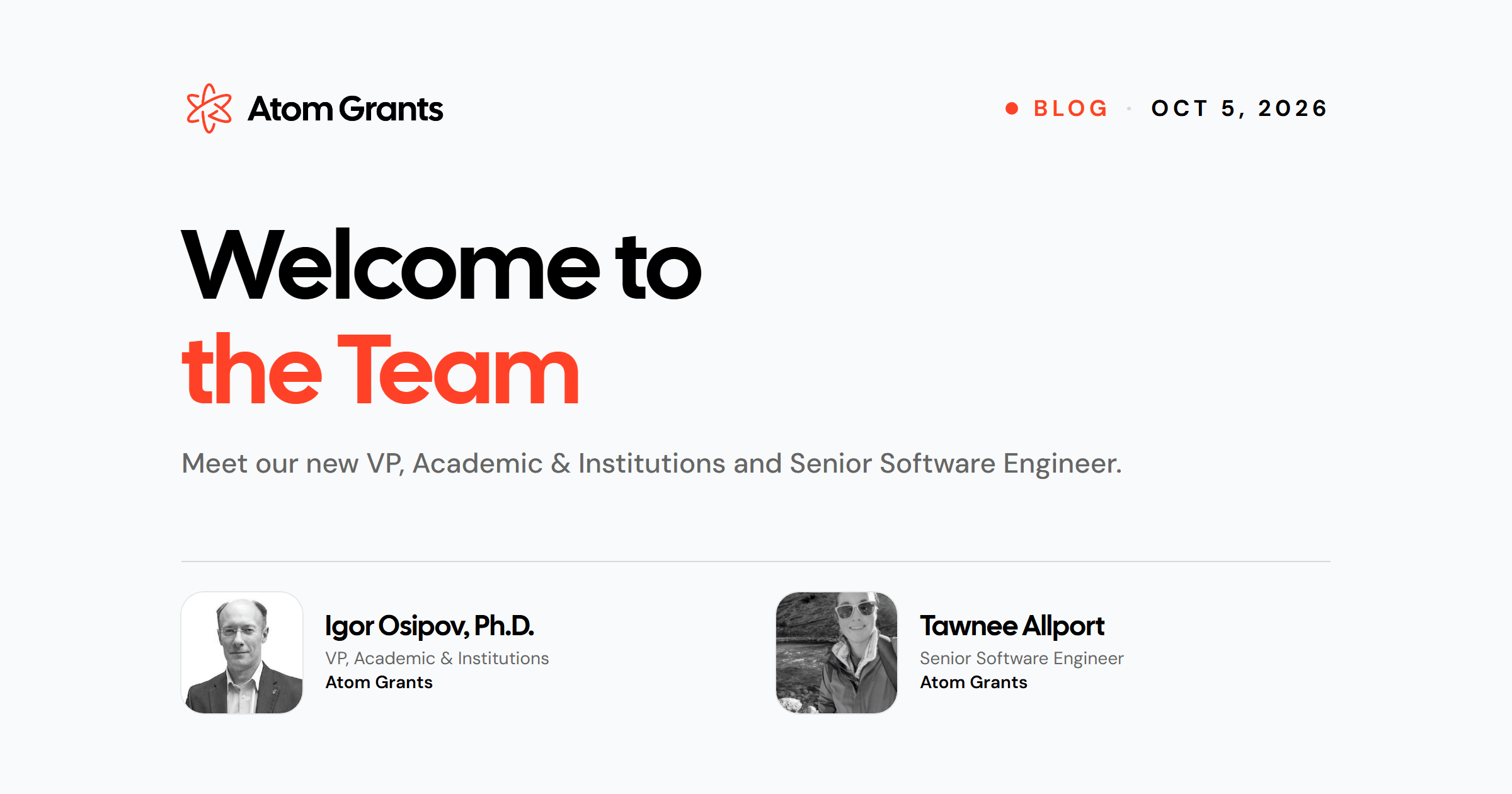
Welcome to the team!
Meet our VP of Academics and Senior Software Engineer
Read post
SRAI Annual Meeting 2026
Leading Research Development in the Age of AI Panel
Read post
Introducing Admin Analytics
The numbers we bring to your check-ins, now in Atom whenever you need them.
Read post
NIH AI Policy: New Rules of AI in Proposal Development
Inside the 2026 NIH policies reshaping how researchers write grants and proposals.
Read post
Budgets, in Atom
A workspace for the whole budget: the spreadsheet, the justification Atom AI can write for you, and the funder rules that grade both.
Read post