Budgets, in Atom
A workspace for the whole budget: the spreadsheet, the justification Atom AI can write for you, and the funder rules that grade both.
AAndrew Dean·August 14, 2026

A budget is the one part of a proposal where being wrong is not a matter of opinion. The narrative can be argued about. A number that does not add up cannot.
It is also the part that lives in the most places at once. The figures are in a spreadsheet, usually built by someone in sponsored programs. The story is in a separate document, usually written by the PI. The rules are split between a solicitation, a funder-wide policy guide that runs hundreds of pages, and federal cost principles nobody enjoys reading. Those three things drift apart quietly. A rate gets updated in the sheet and not the narrative. A postdoc is added in month nine. The equipment line is really three items, none of which is equipment.
Nobody notices until the research office reads it, two days before submission.
The budget workspace is built to notice earlier. It lives inside an Atom proposal, the shared workspace where your team assembles an application, tracks every required document, and works against the solicitation Atom has already read. If your proposal is in Atom, your budget is already in the right place.
Inside it, Atom AI reads the spreadsheet as numbers rather than as text, writes the justification narrative for you when you do not have one, checks those numbers against the rules your funder actually imposes, and reconciles the two documents line by line. This post walks through exactly how it does that, and where every rule it checks comes from.
The budget is one document among many, and the same proposal gets a broader read as well: a requirements and format check on every file, and a full panel-style review of the whole package scored on your funder's own scale. We wrote about that in The Atom AI Reviewer.
One workspace, three steps
Open the Budget document in a proposal and you get a stepper across the top: Spreadsheet, Justification, Requirements. Each step shows its own state, a check when it is clean and an amber warning when something needs attention, and you can jump to any of them at any time. Completion is information, never a lock.
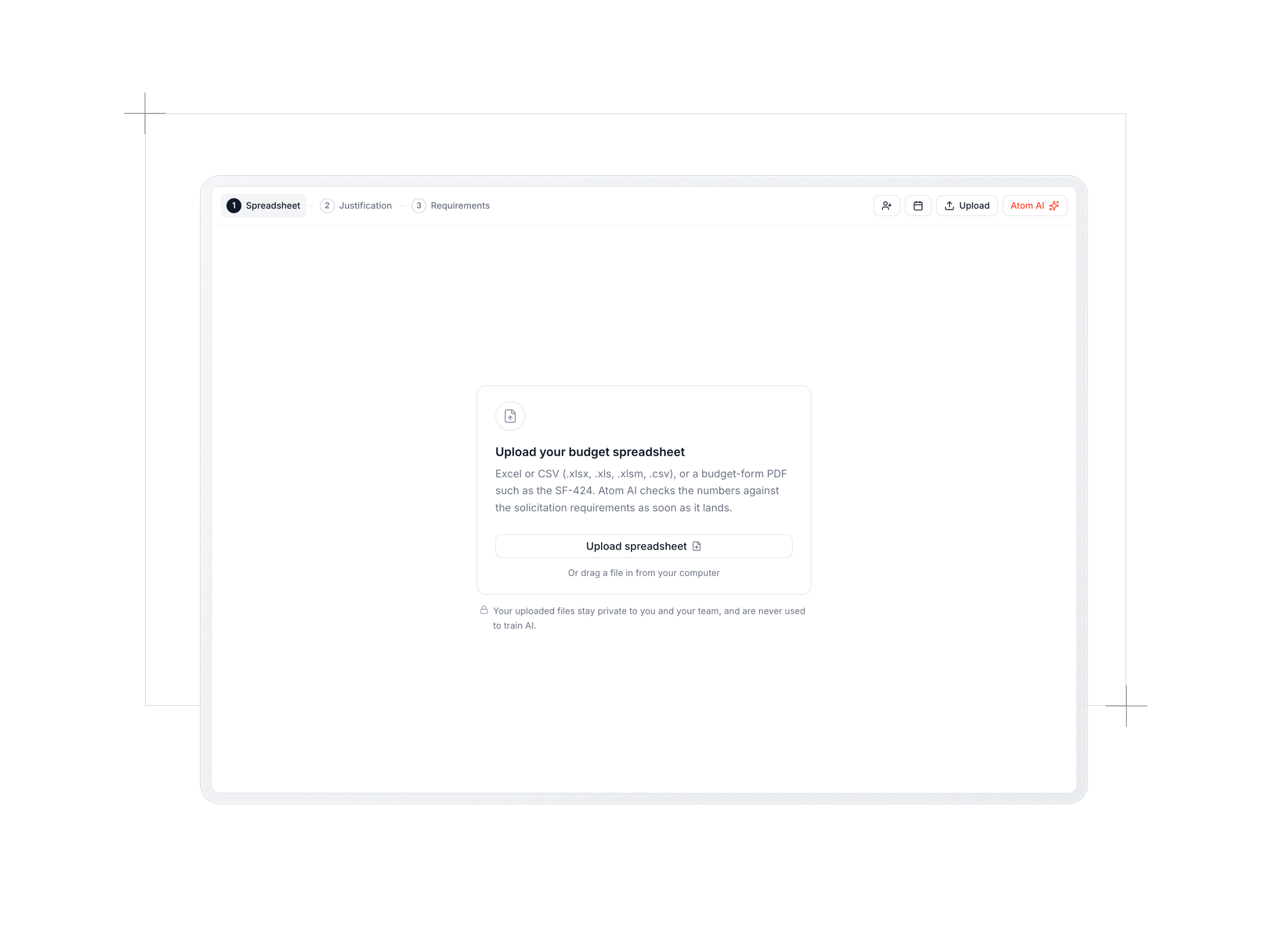
Step 1: the numbers on their own
The first step reads your spreadsheet, not as a document but as a table.
Atom AI opens every sheet in the workbook and preserves the raw cell values, which matters more than it sounds: converting a spreadsheet to text the ordinary way rounds and reformats numbers, and a budget check on rounded numbers is worthless. From those cells it builds a structured budget: every line item with its category and detail, the budget periods, personnel effort in person-months, the roll-up totals, and the rates and parameters sitting in header or assumptions cells (fringe rates by employee class, the indirect rate and its base, escalation percentages, base salaries).
It also captures the basis of estimate behind non-personnel lines, verbatim, with the figures intact: 2,000 GPU-hours at $3.00 per GPU-hour, three travelers at $2,000 per trip, days times a daily rate. That detail is what the justification is graded on later, so it is carried across rather than summarized away.
The extraction has one hard rule: transcribe, never compute. If a number is not in the sheet, it is left out rather than derived. A budget delivered as a PDF instead of a workbook goes through the same path, read directly from the document.
Then the check runs on the table alone:
- Internal arithmetic. Line items to category totals, categories to direct costs, direct plus indirect to the period total, period totals to the grand total. Only figures the sheet actually contains are compared.
- Funder numeric rules. Salary caps, effort limits, the $5,000 equipment threshold, indirect-cost bases and their exclusions, participant support handling, modular increments.
- Solicitation limits. Any cap, per-year limit, project duration, or cost-share requirement the funding opportunity states, including an award ceiling published in the grants.gov synopsis.
- Year over year escalation. Unusual jumps with no visible cause in the line items get flagged as something the justification will need to explain. If a narrative already exists and already explains it, the check passes and says so.
- Whether this budget belongs to this proposal at all. If the spreadsheet's own header names a different program or solicitation number, or its line items clearly belong to another discipline, that is a major finding. Reused budget templates are more common than anyone admits.
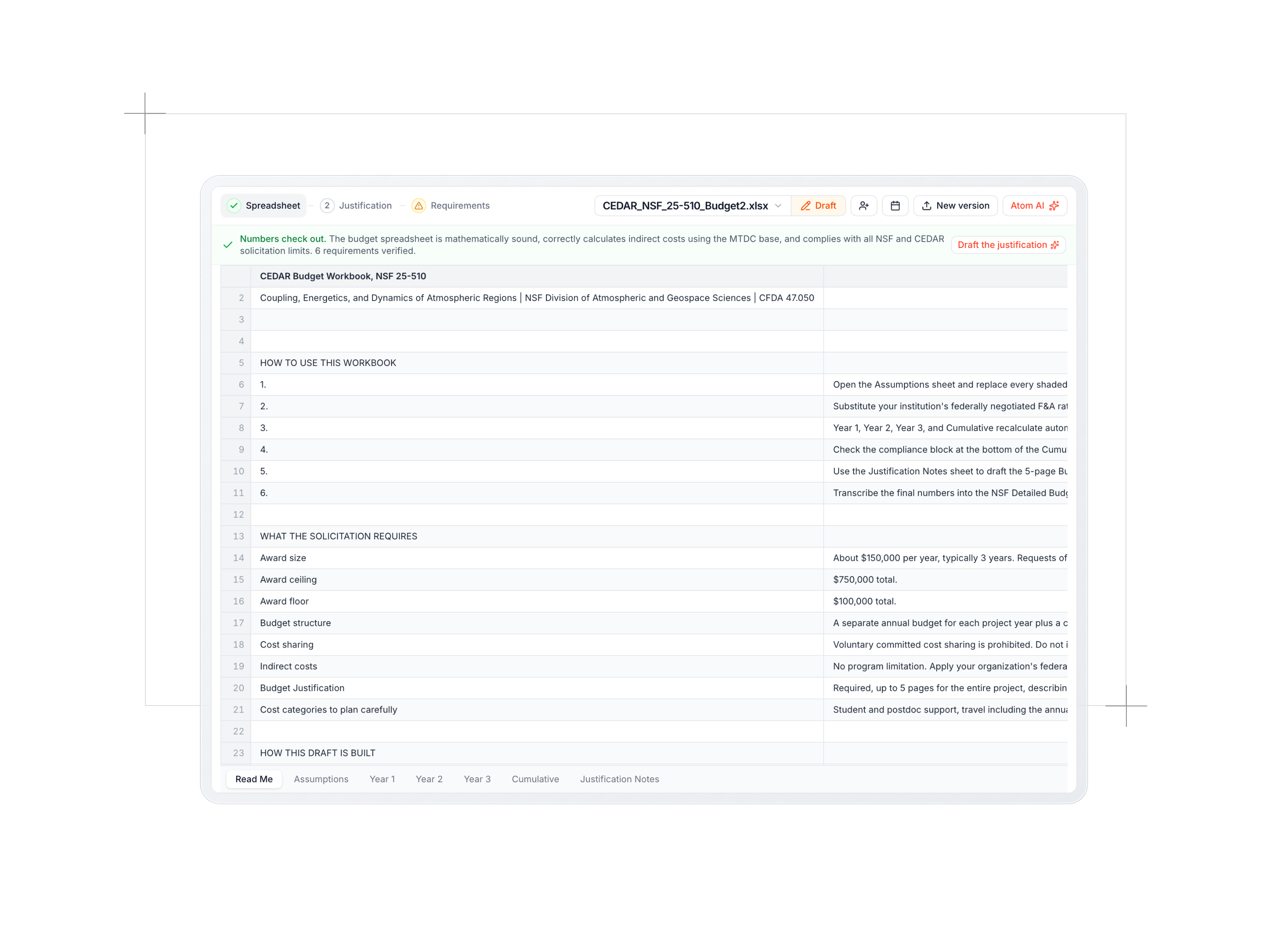
One small thing worth calling out, because it has burned people: a workbook re-saved by a script or an older tool can carry formulas whose computed results were never saved. Every calculated cell in it reads as blank. Most tools will happily report that your budget requests $0. Atom AI detects that state, names it, and tells you to re-open and re-save the file, rather than reviewing a budget that is not there.
Step 2: the justification, drafted or reviewed
Most budget justifications are written last, in a hurry, from a spreadsheet the writer did not build. That is why they read like a list of amounts.
If you do not have one yet, Atom AI writes the first draft. It works from the structured table, the raw cells, the solicitation, and the funder's own format:
- NSF drafts follow PAPPG order, one section per category actually present, with participant support kept strictly in its own section.
- NIH drafts choose the format the way a program officer would. Direct costs at or under $250,000 in every year means a modular justification, with person-months and no salary or fringe dollars anywhere. Above that, or when the solicitation demands it, the detailed R&R justification in form order.
- Department of Education drafts follow the ED Form 524 categories.
- Anything else mirrors the categories the budget itself uses.

The writing rules are strict, and they exist because this is a document you will submit. Every figure is transcribed exactly from the table or the raw cells, never computed or escalated. Every line whose basis the inputs provide has to state that basis: rate times quantity, headcount, days, unit price, hours. Every amount in the table has to appear somewhere in the narrative, because a reviewer cross-checks those line by line. And the draft must read as finished: no placeholders, no bracketed notes, no requests for you to supply something later. Where the sheet genuinely lacks a rate or a quantity, the line says what the cost covers and why it is necessary, and lets the amount stand, rather than inventing a breakdown.
Before you ever see it, the draft is reviewed by the same three passes described below and revised once against its own findings. The revision is kept only if it is genuinely better, weighted by severity rather than by count, so trading a vague sentence for a wrong number never wins. The result is attached to your budget justification requirement as a PDF draft, with its review already saved, so the next step opens warm instead of throwing surprise flags at you.
If you already have a justification, none of that runs. It gets read instead.
Step 3: the requirements check
The third step is where the two documents meet the funder. Three passes run, and a per-requirement checklist is assembled from the results.
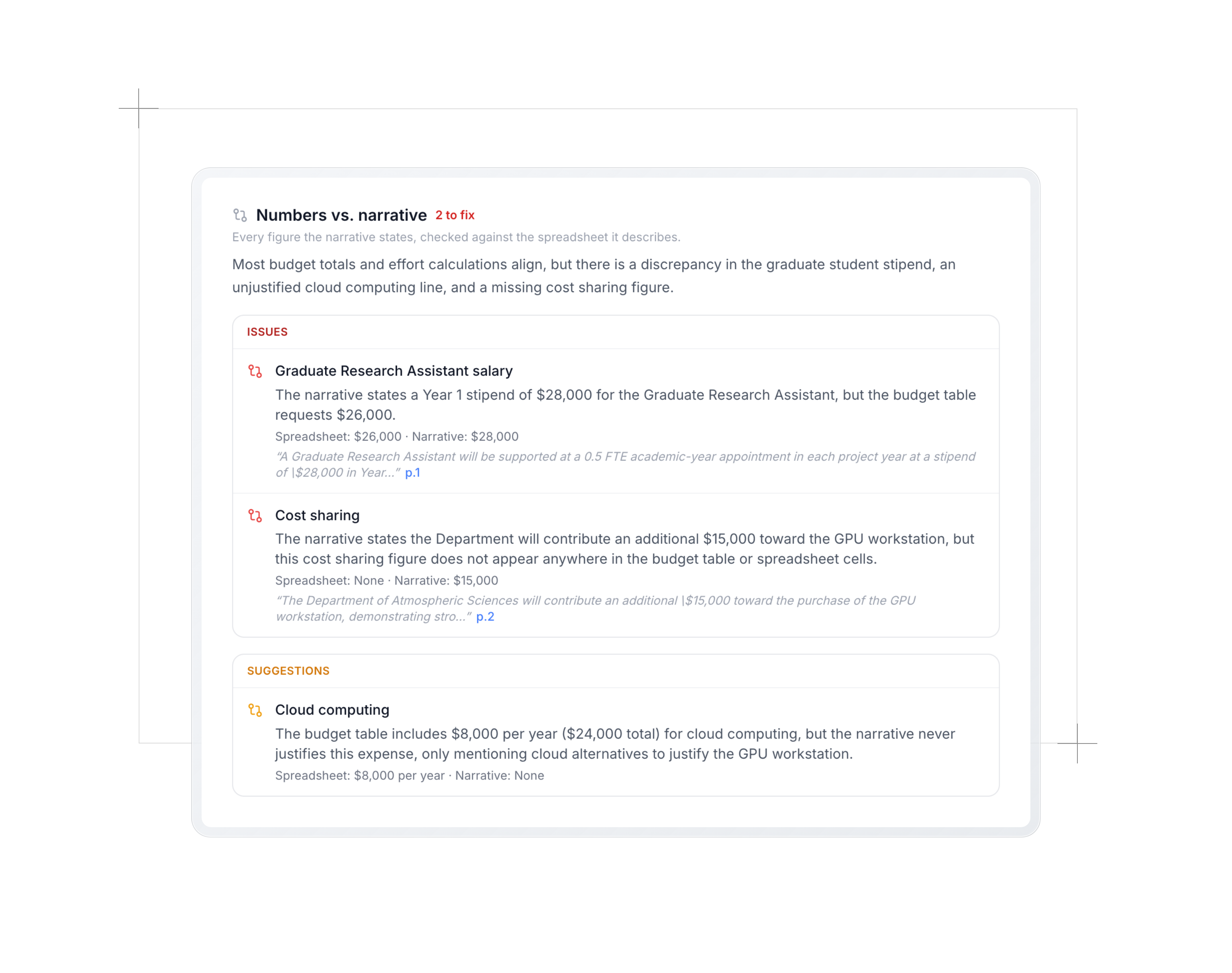
Reconciliation compares the spreadsheet against the narrative. Do the per-category, per-year, direct, indirect, and grand totals match what the narrative claims? Is every non-trivial budgeted line (equipment, travel, a subaward, a consultant, participant support) actually described? Does the narrative promise figures that appear in neither the table nor the raw cells?
It is careful in the places where a naive check produces false alarms. "About $150K" against $149,600 is aligned, not a mismatch. A narrative that states three travelers at $2,000 each is aligned with a $6,000 travel line even though the sheet never itemized it. And when it converts a base salary into a monthly rate, it divides by the months the appointment actually pays: a nine-month academic-year base pays base over nine, which is the normal case for faculty summer salary. If the documents never say which basis a number uses, it says so rather than asserting a dollar mismatch.
Quality reads the narrative the way a program officer would: allowability under the funder's rules and Uniform Guidance, whether each significant line states a real basis rather than a bare dollar amount, whether effort and salary are plausible for the role and scope, whether fringe is applied consistently. It pays particular attention to the costs funders routinely demand justification for and writers routinely skim: data archiving and curation fees, fieldwork travel rationale, consultant and participant compensation rates, computing and specialized software. It ends with one verdict: Strong, Adequate, or Needs Work.
Findings about the narrative are tied to the sentence that triggered them, so clicking one jumps straight to that sentence in the document.
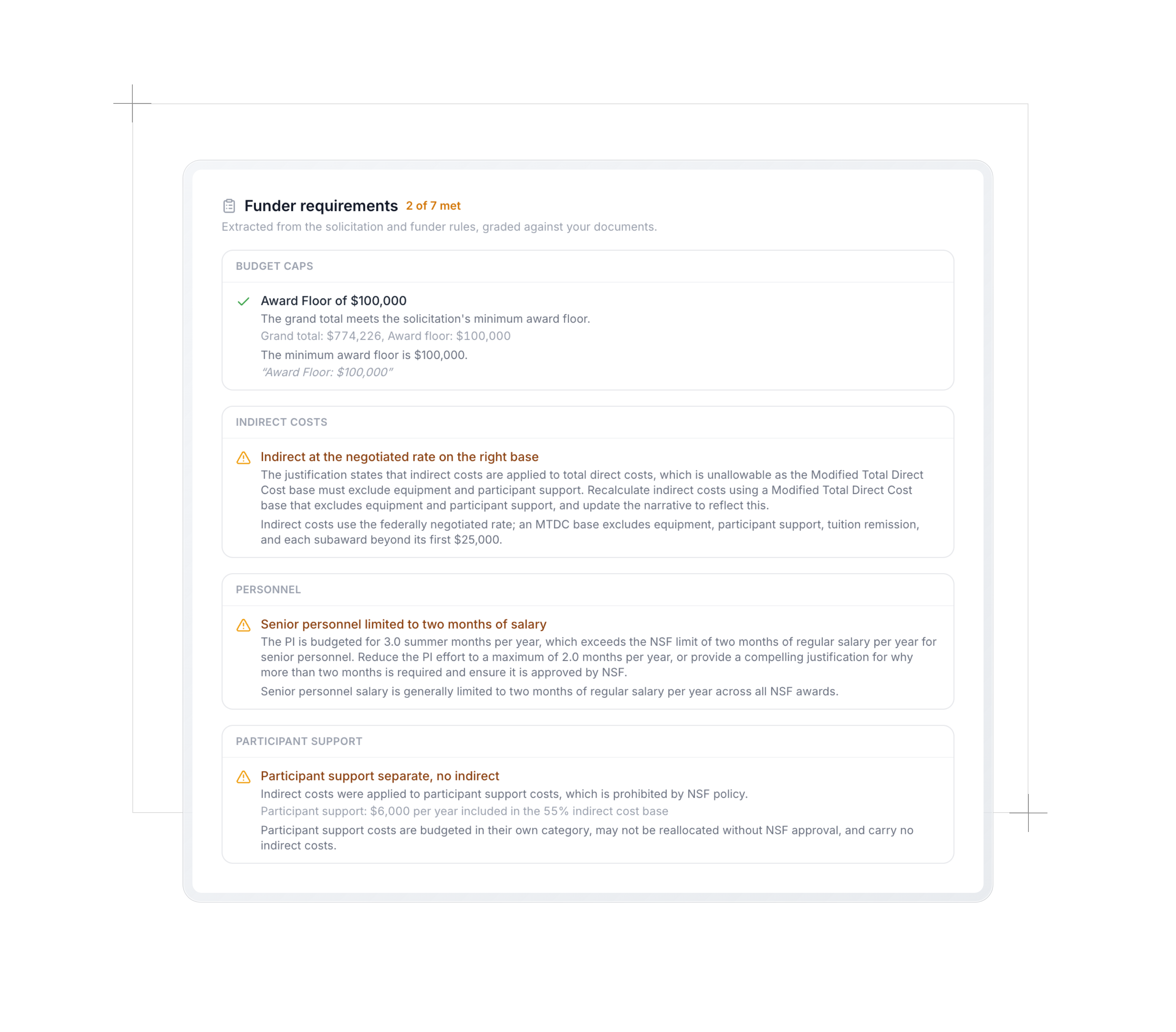
The checklist turns all of it into a row per requirement, with a status and the figures behind it. Where the answer can be computed, it is computed in plain code rather than asked of a model, and that computed verdict wins. An indirect rate against a stated cap, a per-year budget cap against the largest year, a page limit against the rendered page count: those are arithmetic, and arithmetic should not be a judgment call. When a figure the calculation needs is missing, the row abstains instead of guessing, and it tells you which document it is waiting on rather than reporting a vague "unverifiable".
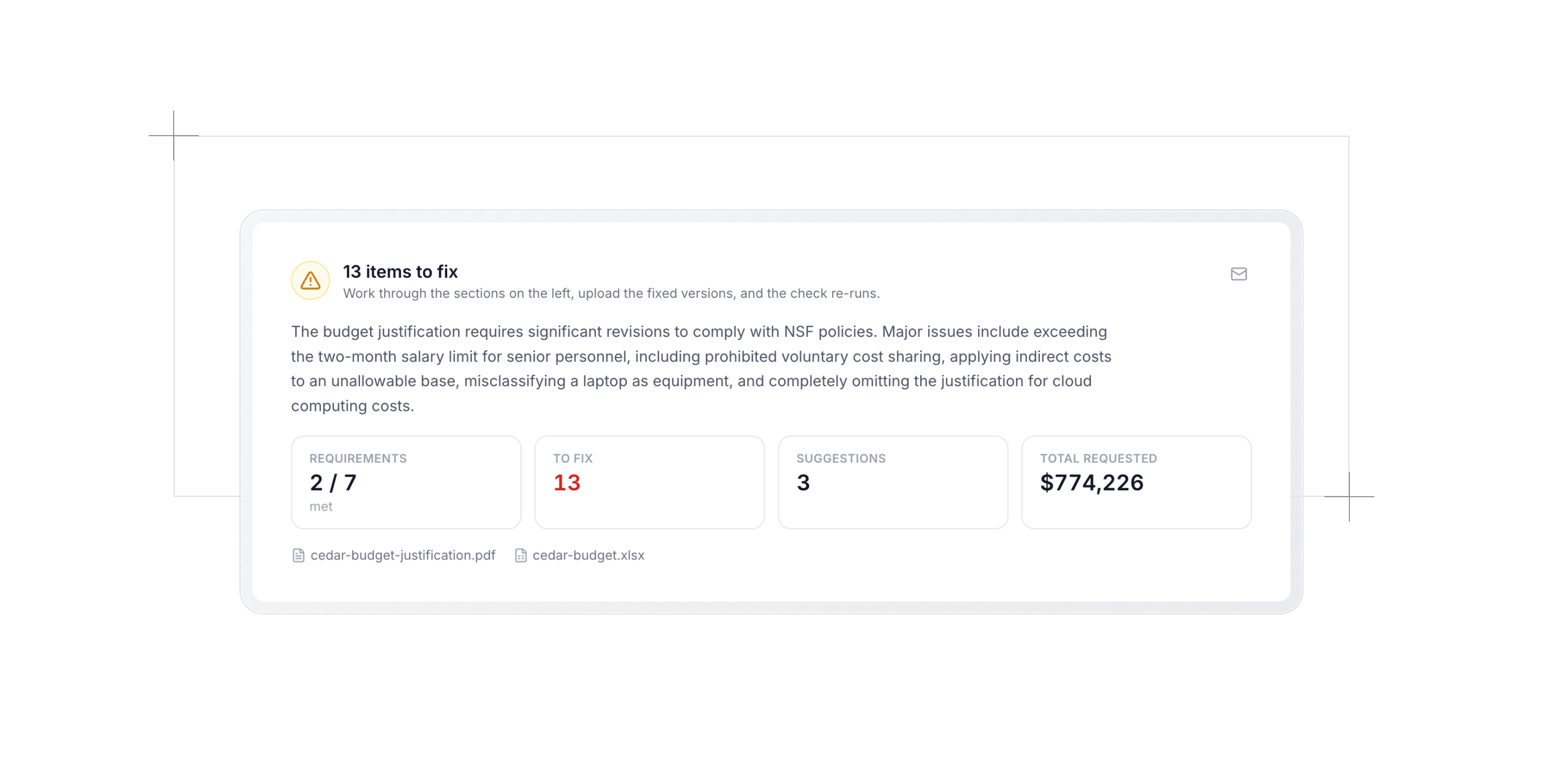
The overview at the top gives you the shape of it at a glance: a verdict, how many requirements were checked, how many things need fixing, how many are suggestions, and the total requested. Every finding names the requirement it concerns, and you can email the whole set to a teammate or your research office from the same view. If either file changes after the check ran, the result is marked out of date rather than quietly presented as current.
Where the rules actually come from
This is the part that decides whether any of the above is worth trusting, so here it is in full. Every rule Atom AI checks comes from one of three places.
Your solicitation. When Atom builds your proposal guide, it pulls the full text of the funding opportunity and every source behind it. The budget reviewer reads the same set, and pulls out the constraints that bind a budget specifically: indirect rate caps, total and per-year budget caps, salary caps, page limits on the justification, effort limits, equipment thresholds, required forms, cost-sharing requirements, participant support rules, and named narrative demands like "justify each consultant's rate". A stated award ceiling counts as a budget cap. A typical or average award size does not, because it does not bind anything.
The funder's own guide. For NSF proposals, that means the budget section of PAPPG Chapter 2, read directly. NSF solicitations link the PAPPG landing page, which contains no actual preparation rules, so Atom swaps in the chapter that does.
Funder-wide rules we encode by hand. Some rules hold no matter what a given solicitation says, and those are written into Atom as fixed values rather than read from anywhere:
- NIH. The salary cap (Executive Level II, $228,000 per year effective January 1, 2026). Modular budgets in $25,000 modules up to $250,000 per year, detailed budgets above that. F&A charged at the negotiated rate and not charged on equipment, patient care, tuition, or the portion of any subaward above $25,000. Effort in person-months.
- NSF. Senior personnel limited to two months of salary per year across all NSF awards. Participant support budgeted separately, carrying no indirect costs and not reallocable without approval. An MTDC base that excludes equipment, participant support, tuition remission, and each subaward beyond its first $25,000, counted over the whole project period rather than per year. A five-page limit on the justification.
- Department of Education. Restricted versus unrestricted indirect rates as the program specifies, and the program's cost-sharing or matching requirements.
- Everyone. Equipment means a per-unit cost of at least $5,000 and a useful life over a year. Costs must be reasonable, allowable, and allocable under Uniform Guidance (2 CFR 200): no entertainment, alumni relations, lobbying, or fines.
When a solicitation states its own version of one of these, the solicitation wins, because it is stricter and more specific. A stated 10 percent de minimis rate replaces the generic negotiated-rate rule. Rules that can hold several values at once never displace their defaults: a solicitation's effort floor is not the NSF two-month rule, and both apply.
How we keep invented numbers out
A hallucinated cap would poison every check downstream of it, so requirement extraction has a hard guardrail: every numeric constraint must carry a verbatim quote from the solicitation that states it. If the quote cannot be found in the source text, the requirement is dropped entirely rather than shown to you. The funder-wide rules above cover what a dropped requirement would have caught, and those cannot be invented because they are not generated at all.
The same principle runs through the rest of the pipeline. Extraction transcribes and never computes. Each pass is told to skip a check rather than infer a missing figure. Deterministic arithmetic overrides model judgment wherever the arithmetic is sound, and where it is not sound in both directions, it only overrides in the direction it can prove: a rate computed against total direct costs is a lower bound on a rate computed against a narrower base, so it can prove you are over a cap but not that you are under one. Rate comparisons carry a small rounding tolerance, so 10.04 percent against a 10 percent cap is treated as rounding rather than a violation.
The passes are also scoped so they do not talk over each other. The spreadsheet check judges only numbers. Reconciliation owns disagreements between the two documents. The quality pass is explicitly told not to restate those disagreements, so you get one finding per problem instead of three.
What this changes, depending on who you are
If you are the PI, the budget stops being the thing you hand off and hope about. You can see whether your narrative actually matches the sheet before your research office does, and you can get a complete first-draft justification out of a spreadsheet in a couple of minutes instead of an afternoon.
If you are in sponsored programs or research development, the mechanical pass happens before the file reaches you. Arithmetic, caps, category rules, page limits, and every line the narrative failed to describe are already found and already listed with their figures. Your read becomes the judgment call it should be, on a document where the obvious problems are gone.
If you support a team, the review is shared. One person runs it, everyone sees the result on the document, and the findings can be emailed straight to whoever needs to act on them. When a file changes, the review is marked out of date instead of silently going stale.
Your uploads stay private to you and your team. Atom never uses your documents to train AI models and never publishes them anywhere.
How to get the most out of it
- Run the spreadsheet check as soon as a budget exists, before the narrative is written. Two of the three passes need only the sheet, and arithmetic problems are cheapest to fix while the sheet is still being built.
- Let Atom AI draft the justification even if you plan to rewrite it. A draft that already states every line's basis and covers every amount in the table is a much better starting point than a blank page, and the structure is the part that takes longest.
- Re-run after every budget change. Budget and narrative drift apart as both move. That drift is exactly what the reconciliation pass exists to catch.
- Read the abstentions. A row that says it needs the spreadsheet, or that it cannot decide from the documents, is telling you something real: usually that a rule turns on a fact neither document states. Those are worth a question to your research office.
- Send the findings, not the file. Emailing the review to a collaborator is faster than explaining which cell you meant.
- Then review the rest of the package. The budget is one document of many, and the full proposal review cross-checks it against the narrative, the timeline, and the team you described.
Try it on your next budget
Budgets fail on details that are entirely checkable: a total that does not roll up, a cap read off the wrong base, an amount in the sheet that nothing in the narrative explains. Those should never be what costs you an award.
The budget workspace is part of Proposals. Open the Budget document in any proposal, upload your spreadsheet, and see what a sponsored-programs read turns up while there is still time to fix it.
A
Andrew Dean
Founding Engineer, Atom Grants
More Blog Posts
Proposals: A more intuitive workspace and inline editor
Proposals has been updated with intuitive navigation for each step, from guide to submission. You can also write documents and build the budget right in Atom instead of only uploading files.
Read postThe 10 Best Grant Databases for 2026
For universities, researchers, and nonprofits
Read post
Welcome to the team!
Meet our VP of Academics and Senior Software Engineer
Read post
SRAI Annual Meeting 2026
Leading Research Development in the Age of AI Panel
Read post
Introducing Admin Analytics
The numbers we bring to your check-ins, now in Atom whenever you need them.
Read post
NIH AI Policy: New Rules of AI in Proposal Development
Inside the 2026 NIH policies reshaping how researchers write grants and proposals.
Read post
Atom AI Reviewer
A funder-grade read of your whole proposal, before anyone else sees the draft.
Read post